

 Well I decided to upgrade my home PC to Windows 10. I have a desktop (not a fan of laptops) so I should never have to see the hideous start screen again. It’s a pretty bold move for me to upgrade to a new version of Windows so soon after its official release. Normally wouldn’t have done it had I not played around with it in the tech preview. Usually I wait until all the install and upgrade bugs have been worked out but there were so many articles (from trusted sources) that said the upgrade is pretty painless I went for it. I had some trepidation because I was worried about which of my previously installed programs and “apps” would and would not work once the upgrade was complete. I really only ran into one issue.
So here is my big tip for upgrading to Windows 10, especially if you are running Windows 7 and you skipped 8 (which is why everyone should have done). If you have any kind of VPN software installed (ex: Cisco AnyConnect) make sure either A) its up to date and compatible with Windows 10 or B) you uninstall it completely. I had done neither of these things and spent the better part of my weekend trying to figure out why my internet wouldn’t work properly – I could only browse secure (https) websites. It was frakkin’ annoying! Apparently even Windows Update doesn’t use a secure connection. Once I completely uninstalled AnyConnect all my internet problems went away.
The other thing I would recommend is the obvious suggestion – Back-Up Important Files! If something were to go terribly wrong with the upgrade you may have to format and reinstall which means all your data would be lost. Use Dropbox, One Drive, Google Drive, USB thumb drives, whatever you need to make sure you have copies of files you don’t want to lose. This should always be the first thing you do anyway.
I would also heed all the articles out there (here’s one) about what to shut off in Windows 10 to maintain your privacy, especially if you are upgrading a desktop computer. You don’t need to send your personal and location information to Microsoft to “enhance your computer and/or browsing experience”. Also, despite all the brouhaha that Mozilla was causing, there is a way to maintain your default browser while upgrading (not that resetting your default browser is terribly difficult to begin with). Do not select Express when you are setting up Windows 10 (after the upgrade completes). This is what all those articles will tell you to do anyway to toggle the various privacy settings. One of the custom options is to choose default programs and you can uncheck Edge.
Unless you want to use Edge, which is entirely up to you. Personally I think its horrid and plain. It doesn’t feel like a modern browser although it does perform better than Internet Explorer (Encyclopedia Britannica performed better than IE), but I still prefer Chrome or FireFox.
I hope your upgrade/install experience goes well and feel free to ask me questions and I can try to answer and/or help.
/cheers
 I could get so much more accomplished if I only had minions!



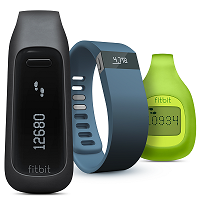 I have been using the same FitBit for over two and a half years now so losing it would give me a great deal of angst. I have probably convinced dozens of friends and family to get their own FitBits and it sometimes baffles me when they say they can’t find theirs (I’m very OCD about checking my pocket probably once an hour for my FitBit, even if I have been sitting for an hour). So the obvious excuse, when I taunt them, is they “lost it” *sigh*
 This week Apple held their annual
  A couple of months ago I decided to start diving into Swift. I know Swift is still in its infancy and Apple seems to be breaking it with every XCode/OS/language update. I had watched all of the videos Pluralsight had to offer (though I noticed they recently published new ones). I have dabbled in Objective-C prior to Swift’s announcement and it is as convoluted and cryptic that everyone says it is; but it’s not impossible to learn. Swift, however, would make iOS app development a heck of a lot easier.